All Stories
We want to show our readers that how much we appreciate support they give to us.In this way i will help your more and will give your blog  attractive social icons which is in the form of truck.The social trucks icons are 10 different icons ,which are in the format of png. In the super size of 512 pixels.Hope you will enjoy it.Absolutely free for you for commercial and personal use.If you like it than share it to your friends and enjoy it.




http://media02.hongkiat.com/social-truck-icons/Social-Truck.zip?utm_source=blog&utm_medium=text&utm_campaign=socialtruck


Change social media Icons Into Trucks

We want to show our readers that how much we appreciate support they give to us.In this way i will help your more and will give your blog  attractive social icons which is in the form of truck.The social trucks icons are 10 different icons ,which are in the format of png. In the super size of 512 pixels.Hope you will enjoy it.Absolutely free for you for commercial and personal use.If you like it than share it to your friends and enjoy it.


http://media02.hongkiat.com/social-truck-icons/Social-Truck.zip?utm_source=blog&utm_medium=text&utm_campaign=socialtruck


Posted at 05:11 |  by Unknown
Add Beautiful heart widget to your blog or website .It will be present at bottom of your web.When you move your courser it opens and the social icons are open.All social media sharing icon are present in that heart.IT is very beautiful and attractive.

Step 1:

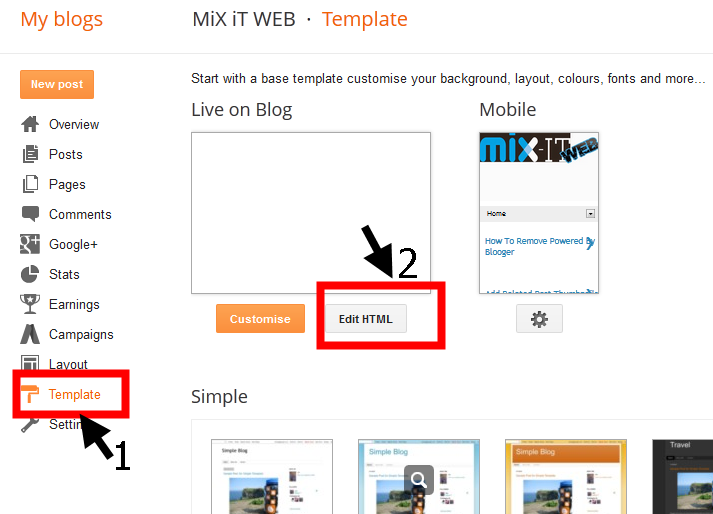
     Go to the template and edit HTML
  

Step 2:

       And press Ctrl+F and serach for </head>
 

Step 3:

Copy and paste the below code above the </head>


  !-- Start Heart Bookmarking Widget From https://mixitweb.blogspot.com -->
<script src='http://w.sharethis.com/gallery/shareegg/shareegg.js' type='text/javascript'/>
<script src='http://w.sharethis.com/button/buttons.js' type='text/javascript'/>
<script type='text/javascript'>stLight.options({publisher: &quot;ur-98d377f-bdd3-9ad1-fbe5-2a678f0a60ee&quot;, onhover:false}); </script>
<link href='http://w.sharethis.com/gallery/shareegg/shareegg.css' media='screen' rel='stylesheet' type='text/css'/>
<!-- End Heart Bookmarking Widget From https://mixitweb.blogspot.com -->

Step 4:

Now search for the below code </body>

Step 5:   

   
Copy and paste this code before </body>

!-- Start Heart Share Code From https://mixitweb.blogspot.com -->
<div style='position: fixed; bottom: 2%; left: 2%;'>
<div class='shareEgg' id='shareThisShareHeart'/>
</div>
<script type='text/javascript'>stlib.shareEgg.createEgg(&#39;shareThisShareHeart&#39;, [&#39;facebook&#39;,&#39;twitter&#39;,&#39;pinterest&#39;,&#39;linkedin&#39;,&#39;stumbleupon&#39;,&#39;email&#39;,&#39;sharethis&#39;], {title:&#39; <data:blog.pageTitle/>&#39;,url:&#39;<data:blog.url/>&#39;,theme:&#39;shareheart&#39;});</script><a href="http://www.coloredblog.com/2014/02/how-to-add-heart-bookmarking-widget-on.html" target="_blank">Widget</a>
<!-- End Heart Share Code From https://mixitweb.blogspot.com -->

Add Beautiful heart widget to your blog or website

Add Beautiful heart widget to your blog or website .It will be present at bottom of your web.When you move your courser it opens and the social icons are open.All social media sharing icon are present in that heart.IT is very beautiful and attractive.

Step 1:

     Go to the template and edit HTML
  

Step 2:

       And press Ctrl+F and serach for </head>
 

Step 3:

Copy and paste the below code above the </head>


  !-- Start Heart Bookmarking Widget From https://mixitweb.blogspot.com -->
<script src='http://w.sharethis.com/gallery/shareegg/shareegg.js' type='text/javascript'/>
<script src='http://w.sharethis.com/button/buttons.js' type='text/javascript'/>
<script type='text/javascript'>stLight.options({publisher: &quot;ur-98d377f-bdd3-9ad1-fbe5-2a678f0a60ee&quot;, onhover:false}); </script>
<link href='http://w.sharethis.com/gallery/shareegg/shareegg.css' media='screen' rel='stylesheet' type='text/css'/>
<!-- End Heart Bookmarking Widget From https://mixitweb.blogspot.com -->

Step 4:

Now search for the below code </body>

Step 5:   

   
Copy and paste this code before </body>

!-- Start Heart Share Code From https://mixitweb.blogspot.com -->
<div style='position: fixed; bottom: 2%; left: 2%;'>
<div class='shareEgg' id='shareThisShareHeart'/>
</div>
<script type='text/javascript'>stlib.shareEgg.createEgg(&#39;shareThisShareHeart&#39;, [&#39;facebook&#39;,&#39;twitter&#39;,&#39;pinterest&#39;,&#39;linkedin&#39;,&#39;stumbleupon&#39;,&#39;email&#39;,&#39;sharethis&#39;], {title:&#39; <data:blog.pageTitle/>&#39;,url:&#39;<data:blog.url/>&#39;,theme:&#39;shareheart&#39;});</script><a href="http://www.coloredblog.com/2014/02/how-to-add-heart-bookmarking-widget-on.html" target="_blank">Widget</a>
<!-- End Heart Share Code From https://mixitweb.blogspot.com -->

Posted at 04:50 |  by Unknown
Add beautiful sexy icons to your website which will increase your sharing and traffic.The social media plays an important role in increase the traffic.When first of all you start your website you should add social media sharing and following icons to your website.This will boost your traffic.
Here i will show you how to add beautiful sexy icon to your website step by step with pics.

Step 1:

  Go to https://www.shareaholic.com 

Step 2:

  Sign Up For free there

Step 3:

  Add your web site name and URL

Step 4:

  Than type the place where you want to post and how you like the sharing icon to be presented on your website.there are many option.


Step 5:

  Than copy the setup Code and add in HTML/JavaScript and place it below the post and than press ok


Add Sexy Social Media Icon To Your Website

Add beautiful sexy icons to your website which will increase your sharing and traffic.The social media plays an important role in increase the traffic.When first of all you start your website you should add social media sharing and following icons to your website.This will boost your traffic.
Here i will show you how to add beautiful sexy icon to your website step by step with pics.

Step 1:

  Go to https://www.shareaholic.com 

Step 2:

  Sign Up For free there

Step 3:

  Add your web site name and URL

Step 4:

  Than type the place where you want to post and how you like the sharing icon to be presented on your website.there are many option.


Step 5:

  Than copy the setup Code and add in HTML/JavaScript and place it below the post and than press ok


Posted at 01:33 |  by Unknown

Alexa Rank

back to top