All Stories
 We Will change the places of post titles with the name of the blog.Why Should WE do this ?
It will help us that it will be easy for the audience to find us more quickly on the search engines because the audience search with post which they not with the name of the blog .We will place the post title at beginning and it will increase the chances to be find on the search engines .


Optimize  Blog Titles For Bigger Search Results Tutorial

Step 1:

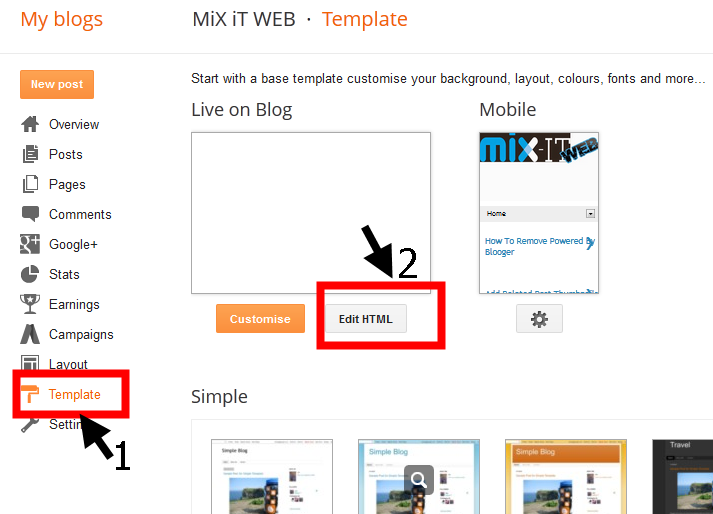
      Go to the edit HTML

Step 2:


      Find the code below with the help of ctrl +F Searcher 
<title><data:blog.pageTitle/></title>

Step 3:

    Replace that code with the below code 
<b:if cond='data:blog.pageType == "item"'>
<title><data:blog.pageName/> |<data:blog.title/></title>
<b:else/>
<title><data:blog.pageTitle/></title> </b:if>


Step 4:

     Save it and your done


Optimize Blog Titles For Bigger Search Results

 We Will change the places of post titles with the name of the blog.Why Should WE do this ?
It will help us that it will be easy for the audience to find us more quickly on the search engines because the audience search with post which they not with the name of the blog .We will place the post title at beginning and it will increase the chances to be find on the search engines .


Optimize  Blog Titles For Bigger Search Results Tutorial

Step 1:

      Go to the edit HTML

Step 2:


      Find the code below with the help of ctrl +F Searcher 
<title><data:blog.pageTitle/></title>

Step 3:

    Replace that code with the below code 
<b:if cond='data:blog.pageType == "item"'>
<title><data:blog.pageName/> |<data:blog.title/></title>
<b:else/>
<title><data:blog.pageTitle/></title> </b:if>


Step 4:

     Save it and your done


Posted at 11:31 |  by Unknown
Alexa Ranking Is a website which show stats of your website.It show your website traffic in full details and also show top links that are pointing your website and than on the basis of these stats they rank your website.If you want to improve your Alexa Ranking than you must follow my tips.


             Increase Alexa Ranking of Your Blog Tutorial


DAILY CONTENT:

         Try to write your articles 2 per day this will increase your Alexa ranking And in a month or two you will so some good changes in ranking.

Alexa Widget:

       Install the Alexa widgets which will show the  rank  of your website by traffic and other stats .There are many types of widgets in Alexa.You can use any of them which will notify you and will give you updates.

Link your Blog:

       Link your blog to any other forum   that will give your more traffic and views and will give you points to make your blog rank more good the more link you your web the more you get benefit from it .


Comments:

       The Comments which the visitor posts on your web increase the Alexa ranking So ask the visitors to leave a comment on your blog . It greatly effect your blog ranking.

Share Posts:

        Share your posts on Facebook,Twitter ,Google and many more to increase your traffic and as i told you it will definitely increase your rank.The best way for new blogger are to join groups and share there articles and get traffic from that.


Increase Alexa Ranking of Your Blog

Alexa Ranking Is a website which show stats of your website.It show your website traffic in full details and also show top links that are pointing your website and than on the basis of these stats they rank your website.If you want to improve your Alexa Ranking than you must follow my tips.


             Increase Alexa Ranking of Your Blog Tutorial


DAILY CONTENT:

         Try to write your articles 2 per day this will increase your Alexa ranking And in a month or two you will so some good changes in ranking.

Alexa Widget:

       Install the Alexa widgets which will show the  rank  of your website by traffic and other stats .There are many types of widgets in Alexa.You can use any of them which will notify you and will give you updates.

Link your Blog:

       Link your blog to any other forum   that will give your more traffic and views and will give you points to make your blog rank more good the more link you your web the more you get benefit from it .


Comments:

       The Comments which the visitor posts on your web increase the Alexa ranking So ask the visitors to leave a comment on your blog . It greatly effect your blog ranking.

Share Posts:

        Share your posts on Facebook,Twitter ,Google and many more to increase your traffic and as i told you it will definitely increase your rank.The best way for new blogger are to join groups and share there articles and get traffic from that.


Posted at 11:11 |  by Unknown
When we link the menu tabs with the labels than when we click the menu tab than this message comes that showing post with label .....Show all posts. Many bloggers want to remove it .If you also want to remove it follow the following steps and make it remove from blog and enjoy blogging.

                  Remove Showing Post With Label....Show All Posts  Tutorial


Step 1:

        Go to  edit HTML  


Step 2:

        Search for this code with the help of ctrl +F 
 <b:includable id='status-message'>

Step 3:

      After you find this code press the arrow and expand it 


Step 4:

  
     Now remove the code from the first to last all.


<b:includable id='status-message'>
<b:if cond='data:navMessage'>
<div class='status-msg-wrap'>
<div class='status-msg-body'>
<data:navMessage/>
</div>
<div class='status-msg-border'>
<div class='status-msg-bg'>
<div class='status-msg-hidden'><data:navMessage/></div>
</div>
</div>
</div>
<div style='clear: both;'/>
</b:if>
</b:includable>


Step 5:

   
    Now replace it with the following code

<b:includable id='status-message'>
<b:if cond='data:navMessage'>
<div>
</div>
<div style='clear: both;'/>
</b:if>
</b:includable>


Step 6:

      Now save it and you are done.Hope it will help you.


Remove Showing Post With Label in Blogger

When we link the menu tabs with the labels than when we click the menu tab than this message comes that showing post with label .....Show all posts. Many bloggers want to remove it .If you also want to remove it follow the following steps and make it remove from blog and enjoy blogging.

                  Remove Showing Post With Label....Show All Posts  Tutorial


Step 1:

        Go to  edit HTML  


Step 2:

        Search for this code with the help of ctrl +F 
 <b:includable id='status-message'>

Step 3:

      After you find this code press the arrow and expand it 


Step 4:

  
     Now remove the code from the first to last all.


<b:includable id='status-message'>
<b:if cond='data:navMessage'>
<div class='status-msg-wrap'>
<div class='status-msg-body'>
<data:navMessage/>
</div>
<div class='status-msg-border'>
<div class='status-msg-bg'>
<div class='status-msg-hidden'><data:navMessage/></div>
</div>
</div>
</div>
<div style='clear: both;'/>
</b:if>
</b:includable>


Step 5:

   
    Now replace it with the following code

<b:includable id='status-message'>
<b:if cond='data:navMessage'>
<div>
</div>
<div style='clear: both;'/>
</b:if>
</b:includable>


Step 6:

      Now save it and you are done.Hope it will help you.


Posted at 04:40 |  by Unknown

 Blogger is a huge website for  creating your own blog and making money from it by displaying Ads on it.But we need a blogger template that is theme of the website and will make it good looking .We need SEO friendly template have social media sharing icons and related posts thumbnail and easy to customize.The template you chose must be quick loader or other vise if it is not the visitor will leave your website .

CRICKET MAG


http://www.templateism.com/p/preview.html?url=http://cricmagtheme.blogspot.com/ http://templateism.com/blogger-templates/Cricket-Mag-Blogger-Template.zip


Busby:


DATEALIVE:


http://btemplates.com/2013/blogger-template-date-a-live/demo/ http://btemplates.com/2013/blogger-template-date-a-live/


BRAND MAG UX:


BOARD WALK: 


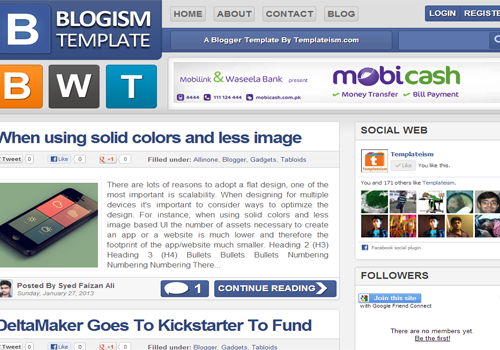
BLOGISM : 


 CHERRY MAG: 


 DMC WHITE GIRD:


                                        http://dcm-white.blogspot.in/#pages/1 http://urang-kurai.blogspot.com/2013/05/dcm-white.html


 DESIGN MAG:


http://btemplates.com/2013/blogger-template-designmag/demo/ http://btemplates.com/2013/blogger-template-designmag/


 BOGZIMINE :


http://generation-platinum1d21.blogspot.in/ http://urang-kurai.blogspot.com/2012/04/2-template-blogazine-new.html

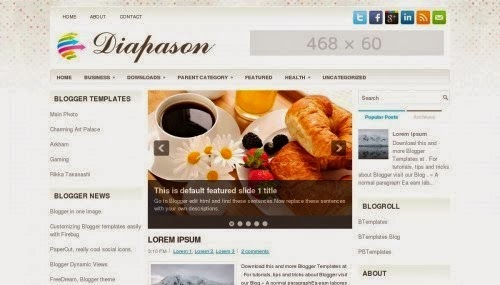
  DIAPASON:


http://btemplates.com/2013/blogger-template-diapason/demo/ http://btemplates.com/2013/blogger-template-diapason/

 DIYWP:


http://btemplates.com/2013/blogger-template-diywp/demo/ http://btemplates.com/2013/blogger-template-diywp/


 DAZLING:


http://www.templateism.com/p/preview.html?url=http://dazzlingdesigner.blogspot.com/ http://templateism.com/blogger-templates/Dazzling-Designer-Blogger-Template.zip

13+ Free Blogger Template


 Blogger is a huge website for  creating your own blog and making money from it by displaying Ads on it.But we need a blogger template that is theme of the website and will make it good looking .We need SEO friendly template have social media sharing icons and related posts thumbnail and easy to customize.The template you chose must be quick loader or other vise if it is not the visitor will leave your website .

CRICKET MAG


http://www.templateism.com/p/preview.html?url=http://cricmagtheme.blogspot.com/ http://templateism.com/blogger-templates/Cricket-Mag-Blogger-Template.zip


Busby:


DATEALIVE:


http://btemplates.com/2013/blogger-template-date-a-live/demo/ http://btemplates.com/2013/blogger-template-date-a-live/


BRAND MAG UX:


BOARD WALK: 


BLOGISM : 


 CHERRY MAG: 


 DMC WHITE GIRD:


                                        http://dcm-white.blogspot.in/#pages/1 http://urang-kurai.blogspot.com/2013/05/dcm-white.html


 DESIGN MAG:


http://btemplates.com/2013/blogger-template-designmag/demo/ http://btemplates.com/2013/blogger-template-designmag/


 BOGZIMINE :


http://generation-platinum1d21.blogspot.in/ http://urang-kurai.blogspot.com/2012/04/2-template-blogazine-new.html

  DIAPASON:


http://btemplates.com/2013/blogger-template-diapason/demo/ http://btemplates.com/2013/blogger-template-diapason/

 DIYWP:


http://btemplates.com/2013/blogger-template-diywp/demo/ http://btemplates.com/2013/blogger-template-diywp/


 DAZLING:


http://www.templateism.com/p/preview.html?url=http://dazzlingdesigner.blogspot.com/ http://templateism.com/blogger-templates/Dazzling-Designer-Blogger-Template.zip

Posted at 08:24 |  by Unknown
 CustomizeME  Blogger template is very good and attractive blooger and a very fast loading template which free.Its customization is too easy all you do is go to customize button and customize the thins what you want.

Some of the important feature of this template is :
  • Recent Posts
  • Recent Comment
  • Page Numbering
  • Social Media Icon
  • Related Posts Thumbnails
  • About Author  Thumbnail With Image
  • SEO Friendly
  • Easy Editing
  • And Many More....... 


                        DEMO

https://app.box.com/s/c8bv03v55bgrhxe29yn2


CostomizeMe Best Blogger Template

 CustomizeME  Blogger template is very good and attractive blooger and a very fast loading template which free.Its customization is too easy all you do is go to customize button and customize the thins what you want.

Some of the important feature of this template is :
  • Recent Posts
  • Recent Comment
  • Page Numbering
  • Social Media Icon
  • Related Posts Thumbnails
  • About Author  Thumbnail With Image
  • SEO Friendly
  • Easy Editing
  • And Many More....... 


                        DEMO

https://app.box.com/s/c8bv03v55bgrhxe29yn2


Posted at 04:58 |  by Unknown
Add Beautiful heart widget to your blog or website .It will be present at bottom of your web.When you move your courser it opens and the social icons are open.All social media sharing icon are present in that heart.IT is very beautiful and attractive.

Step 1:

     Go to the template and edit HTML
  

Step 2:

       And press Ctrl+F and serach for </head>
 

Step 3:

Copy and paste the below code above the </head>


  !-- Start Heart Bookmarking Widget From https://mixitweb.blogspot.com -->
<script src='http://w.sharethis.com/gallery/shareegg/shareegg.js' type='text/javascript'/>
<script src='http://w.sharethis.com/button/buttons.js' type='text/javascript'/>
<script type='text/javascript'>stLight.options({publisher: &quot;ur-98d377f-bdd3-9ad1-fbe5-2a678f0a60ee&quot;, onhover:false}); </script>
<link href='http://w.sharethis.com/gallery/shareegg/shareegg.css' media='screen' rel='stylesheet' type='text/css'/>
<!-- End Heart Bookmarking Widget From https://mixitweb.blogspot.com -->

Step 4:

Now search for the below code </body>

Step 5:   

   
Copy and paste this code before </body>

!-- Start Heart Share Code From https://mixitweb.blogspot.com -->
<div style='position: fixed; bottom: 2%; left: 2%;'>
<div class='shareEgg' id='shareThisShareHeart'/>
</div>
<script type='text/javascript'>stlib.shareEgg.createEgg(&#39;shareThisShareHeart&#39;, [&#39;facebook&#39;,&#39;twitter&#39;,&#39;pinterest&#39;,&#39;linkedin&#39;,&#39;stumbleupon&#39;,&#39;email&#39;,&#39;sharethis&#39;], {title:&#39; <data:blog.pageTitle/>&#39;,url:&#39;<data:blog.url/>&#39;,theme:&#39;shareheart&#39;});</script><a href="http://www.coloredblog.com/2014/02/how-to-add-heart-bookmarking-widget-on.html" target="_blank">Widget</a>
<!-- End Heart Share Code From https://mixitweb.blogspot.com -->

Add Beautiful heart widget to your blog or website

Add Beautiful heart widget to your blog or website .It will be present at bottom of your web.When you move your courser it opens and the social icons are open.All social media sharing icon are present in that heart.IT is very beautiful and attractive.

Step 1:

     Go to the template and edit HTML
  

Step 2:

       And press Ctrl+F and serach for </head>
 

Step 3:

Copy and paste the below code above the </head>


  !-- Start Heart Bookmarking Widget From https://mixitweb.blogspot.com -->
<script src='http://w.sharethis.com/gallery/shareegg/shareegg.js' type='text/javascript'/>
<script src='http://w.sharethis.com/button/buttons.js' type='text/javascript'/>
<script type='text/javascript'>stLight.options({publisher: &quot;ur-98d377f-bdd3-9ad1-fbe5-2a678f0a60ee&quot;, onhover:false}); </script>
<link href='http://w.sharethis.com/gallery/shareegg/shareegg.css' media='screen' rel='stylesheet' type='text/css'/>
<!-- End Heart Bookmarking Widget From https://mixitweb.blogspot.com -->

Step 4:

Now search for the below code </body>

Step 5:   

   
Copy and paste this code before </body>

!-- Start Heart Share Code From https://mixitweb.blogspot.com -->
<div style='position: fixed; bottom: 2%; left: 2%;'>
<div class='shareEgg' id='shareThisShareHeart'/>
</div>
<script type='text/javascript'>stlib.shareEgg.createEgg(&#39;shareThisShareHeart&#39;, [&#39;facebook&#39;,&#39;twitter&#39;,&#39;pinterest&#39;,&#39;linkedin&#39;,&#39;stumbleupon&#39;,&#39;email&#39;,&#39;sharethis&#39;], {title:&#39; <data:blog.pageTitle/>&#39;,url:&#39;<data:blog.url/>&#39;,theme:&#39;shareheart&#39;});</script><a href="http://www.coloredblog.com/2014/02/how-to-add-heart-bookmarking-widget-on.html" target="_blank">Widget</a>
<!-- End Heart Share Code From https://mixitweb.blogspot.com -->

Posted at 04:50 |  by Unknown
It is very important that you website or blog has the subscription button with this the visitors will subscribe when they will come to your website or blog and will subscribe with  your blog and will receive your articles as you update it .So they will not miss a single article and you will increase your traffic and boost your money.

           FLOW THE STEP BELOW TO ADD THIS WIDGET TO YOUR BLOG

Step 1:

  Go to the template and edit HTML

Step 2:

     Now find this code <div class='post-footer'>  with the help of Ctrl +F

Step 3:

       Now past the folllowing HTML code above this <div class='post-footer'>

<div id="helperblogger-emailbox">
    <form id="helperblogger-emailform" action="http://feedburner.google.com/fb/a/mailverify"
    method="post" target="popupwindow" onsubmit="window.open('http://feedburner.google.com/fb/a/mailverify?uri= lordhtml', 'popupwindow', 'scrollbars=yes,width=550,height=520');return true">
        <input type="hidden" value="lordhtml " name="uri" />
        <input type="text" id="s" name="email" value="Enter Your E-Mail Here"
        onfocus='if (this.value == "Enter Your E-Mail Here") {this.value = ""}'
        onblur='if (this.value == "") {this.value = "Enter Your E-Mail Here";}'
        />
        <input type="hidden" name="loc" value="en_US" />
        <input type="image" src="http://img1.blogblog.com/img/blank.gif" id="sbutton"
        />
    </form>
</div>

Step 4:

Now find this code   ]]></b:skin>

Step 5:

   And paste this code above  ]]></b:skin>
   
#helperblogger-emailbox {
    background: url(https://blogger.googleusercontent.com/img/b/R29vZ2xl/AVvXsEhyb5b9uPocKTtWcgTmxKEzcNUN-GJBQbhgRtlMW16YQqKiftjkXnN-CnQU4oiW8n_i8NszuZaxT_E35gZP7bPdF8yBVLJwPN7Yw16hDaU02wRjuZBvH4-COmOJQF65lWJJYVUKgE14hrA/s1600/helperblogger.com-red.png)no-repeat scroll center center transparent;
    height: 143px;
    width: 368px;
}
form#helperblogger-emailform {
    display: block;
    margin: 0;
    padding-left: 42px;
    padding-top: 67px;
}
form#helperblogger-emailform #s {
    background: transparent;
    border: none;
    color: #444242;
    font-family: georgia;
    font-size: 15px;
    font-style: italic;
    height: 30px;
    margin-top: -2px;
    padding-left: 2px;
    vertical-align: top;
    width: 227px;
}
form#helperblogger-emailform #sbutton {
    background: transparent;
    border: none;
    cursor: pointer;
    height: 30px;
    padding-right: 45px;
}

Step 6:

    Save the template and now you are done.


Add Best Email Subscrition Box For Bloggers

It is very important that you website or blog has the subscription button with this the visitors will subscribe when they will come to your website or blog and will subscribe with  your blog and will receive your articles as you update it .So they will not miss a single article and you will increase your traffic and boost your money.

           FLOW THE STEP BELOW TO ADD THIS WIDGET TO YOUR BLOG

Step 1:

  Go to the template and edit HTML

Step 2:

     Now find this code <div class='post-footer'>  with the help of Ctrl +F

Step 3:

       Now past the folllowing HTML code above this <div class='post-footer'>

<div id="helperblogger-emailbox">
    <form id="helperblogger-emailform" action="http://feedburner.google.com/fb/a/mailverify"
    method="post" target="popupwindow" onsubmit="window.open('http://feedburner.google.com/fb/a/mailverify?uri= lordhtml', 'popupwindow', 'scrollbars=yes,width=550,height=520');return true">
        <input type="hidden" value="lordhtml " name="uri" />
        <input type="text" id="s" name="email" value="Enter Your E-Mail Here"
        onfocus='if (this.value == "Enter Your E-Mail Here") {this.value = ""}'
        onblur='if (this.value == "") {this.value = "Enter Your E-Mail Here";}'
        />
        <input type="hidden" name="loc" value="en_US" />
        <input type="image" src="http://img1.blogblog.com/img/blank.gif" id="sbutton"
        />
    </form>
</div>

Step 4:

Now find this code   ]]></b:skin>

Step 5:

   And paste this code above  ]]></b:skin>
   
#helperblogger-emailbox {
    background: url(https://blogger.googleusercontent.com/img/b/R29vZ2xl/AVvXsEhyb5b9uPocKTtWcgTmxKEzcNUN-GJBQbhgRtlMW16YQqKiftjkXnN-CnQU4oiW8n_i8NszuZaxT_E35gZP7bPdF8yBVLJwPN7Yw16hDaU02wRjuZBvH4-COmOJQF65lWJJYVUKgE14hrA/s1600/helperblogger.com-red.png)no-repeat scroll center center transparent;
    height: 143px;
    width: 368px;
}
form#helperblogger-emailform {
    display: block;
    margin: 0;
    padding-left: 42px;
    padding-top: 67px;
}
form#helperblogger-emailform #s {
    background: transparent;
    border: none;
    color: #444242;
    font-family: georgia;
    font-size: 15px;
    font-style: italic;
    height: 30px;
    margin-top: -2px;
    padding-left: 2px;
    vertical-align: top;
    width: 227px;
}
form#helperblogger-emailform #sbutton {
    background: transparent;
    border: none;
    cursor: pointer;
    height: 30px;
    padding-right: 45px;
}

Step 6:

    Save the template and now you are done.


Posted at 04:11 |  by Unknown
When you start blog and start writing articles every day ,It is very simple but have you ever look that how the bloggers make thousand of dollars monthly. Here i will show you how to become successful blogger and will give you  six free tips by the following of which you can become a successful blogger .

Writing Skills:

    You must have good writing  skills and writing skills means you should have good English and fast typing hands.I am not talking about that you must be expert but you must be good because that writing skills play an important role in a successful blog .


Work Hard:

      Its is not too easy to make a blog and write articles and you will become a successful blogger.But it is too hard too become a successful blogger.I have visited to many successful blogger and are working for it with last five or four year .It means that that have work hard for five year and now they are successful blogger and earn a lot of money.


Patience:

   You must have patience as i told you it need five to four years to make a successful blog and earn money from it in thousand of dollars but if you have patience you can do it and one day you will be a successful blogger so be have patience and if you don't have patience and you are quick or want quick money form a blog you must quit now.


Regularity in Posting:

        You should no publish your post irregular that will not help you in  becoming a successful blogger but will reduce your blog traffic.For example if you are not post for  one month so all the traffic will become bored because there no new thing and if you are post regularly day by day single post that will boost your traffic.


Unique Content:

                  We all know that we must have a unique content but still we copy the content of each other.When i first started blogging i was doing this but later i understand this is not correct way then i started new blog with unique content and now i am making Good money with that.One thing more when you copy some the search engine don't display your post on their web so you will be have zero traffic.

Top Five Tips To Make A Successful Blog

When you start blog and start writing articles every day ,It is very simple but have you ever look that how the bloggers make thousand of dollars monthly. Here i will show you how to become successful blogger and will give you  six free tips by the following of which you can become a successful blogger .

Writing Skills:

    You must have good writing  skills and writing skills means you should have good English and fast typing hands.I am not talking about that you must be expert but you must be good because that writing skills play an important role in a successful blog .


Work Hard:

      Its is not too easy to make a blog and write articles and you will become a successful blogger.But it is too hard too become a successful blogger.I have visited to many successful blogger and are working for it with last five or four year .It means that that have work hard for five year and now they are successful blogger and earn a lot of money.


Patience:

   You must have patience as i told you it need five to four years to make a successful blog and earn money from it in thousand of dollars but if you have patience you can do it and one day you will be a successful blogger so be have patience and if you don't have patience and you are quick or want quick money form a blog you must quit now.


Regularity in Posting:

        You should no publish your post irregular that will not help you in  becoming a successful blogger but will reduce your blog traffic.For example if you are not post for  one month so all the traffic will become bored because there no new thing and if you are post regularly day by day single post that will boost your traffic.


Unique Content:

                  We all know that we must have a unique content but still we copy the content of each other.When i first started blogging i was doing this but later i understand this is not correct way then i started new blog with unique content and now i am making Good money with that.One thing more when you copy some the search engine don't display your post on their web so you will be have zero traffic.

Posted at 12:15 |  by Unknown

Alexa Rank

back to top